Simple CI-workflow example for agentic publishing
I've long done work with single dev workflows, where the CI-machine has been my laptop. That's perfectly fine for small software projects and stuff that does not require that much collaboration. Now I've hit a limit on that, because agents have become my team, so I needed a better solution.
Kalle Tolonen
Sept. 6, 2026
Server side stuff
Create a dedicated user for deployment
# 1. Create user with disabled password and no interactive prompts
sudo adduser --disabled-password --gecos "" my_user

# 2. Generate key directly inside ~/.ssh/ as my_user
sudo -u my_user ssh-keygen -t ed25519 -C "github-actions-deploy" -f /home/my_user/.ssh/deploy_ci_key -N ""

# 3. Append the public key with security restrictions to authorized_keys
sudo -u my_user sh -c 'printf "restrict,no-port-forwarding,no-X11-forwarding,no-agent-forwarding,no-pty " >> /home/my_user/.ssh/authorized_keys && cat /home/my_user/.ssh/deploy_ci_key.pub >> /home/my_user/.ssh/authorized_keys'

# 4. Set strict SSH permissions and ownership
sudo chmod 700 /home/my_user/.ssh
sudo chmod 600 /home/my_user/.ssh/authorized_keys
sudo chown -R my_user:my_user /home/my_user/.ssh

# 5. Output the private key (to copy into GitHub Secrets as SSH_PRIVATE_KEY)
sudo cat /home/my_user/.ssh/deploy_ci_key

# 6. Shred the raw key files from the server
sudo shred -u /home/my_user/.ssh/deploy_ci_key /home/my_user/.ssh/deploy_ci_key.pub

# 7. Grant ownership of the web deployment directory to my_user
sudo mkdir -p /path/to/your/web/root
sudo chown -R my_user:my_user /path/to/your/web/root

# 8. Grab your server's ssh-fingerprint (and save it to Github's secrets as SSH_KNOWN_HOSTS) from a Trusted machine, preferably server itself
ssh-keyscan -H your_server_ip_or_domain
Flags explained for auth keys:
| Option | What it does |
|---|---|
restrict |
Master switch. Enables a broad set of modern restrictions (including the ones listed after it) and disables things like Unix domain socket forwarding. |
no-port-forwarding |
Blocks SSH port forwarding (-L, -R, -D). Prevents the key from being used to tunnel traffic through the server. |
no-X11-forwarding |
Disables X11 graphical forwarding. Harmless on most servers, but good to block. |
no-agent-forwarding |
Prevents SSH agent forwarding. Stops the key from being used to authenticate to other machines. |
no-pty |
Prevents allocation of a pseudo-terminal. Makes interactive shells much harder to obtain. |
Github-secrets
Github can act as a hub for storing sensitive info, so lets outsource that to them. You can access them from the url:
https://github.com/your_github_user/your_repo/settings/secrets/actions
 Settings
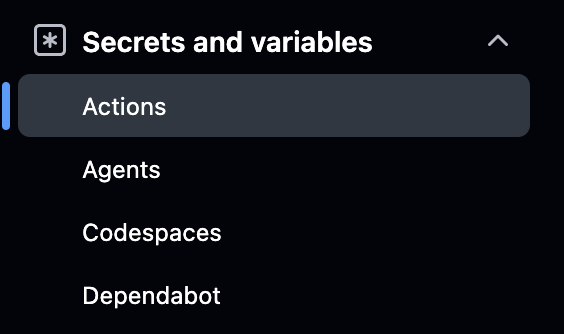 Actions
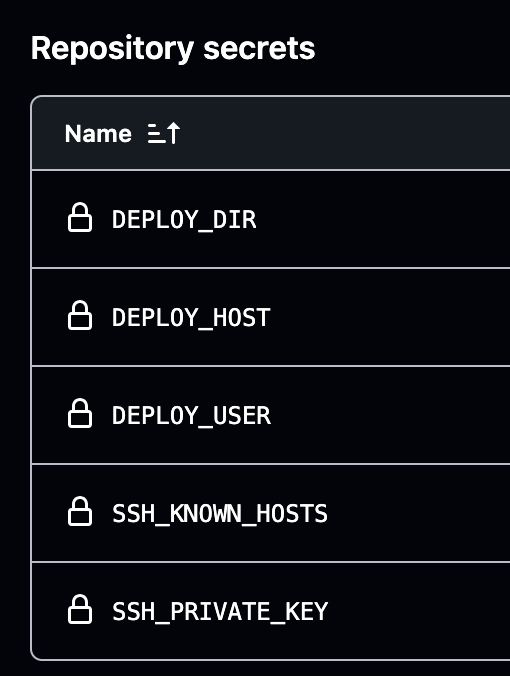 Variables added
Repository workflow
name: Deploy

on:
  push:
    branches: [ main ]

concurrency:
  group: production-deploy
  cancel-in-progress: true

jobs:
  deploy:
    runs-on: ubuntu-latest

    steps:
      - name: Checkout code
        uses: actions/checkout@v4

      - name: Configure SSH
        run: |
          mkdir -p ~/.ssh
          echo "${{ secrets.SSH_PRIVATE_KEY }}" > ~/.ssh/id_ed25519
          chmod 600 ~/.ssh/id_ed25519
          echo "${{ secrets.SSH_KNOWN_HOSTS }}" > ~/.ssh/known_hosts
          chmod 644 ~/.ssh/known_hosts

      - name: Run deploy target
        env:
          DEPLOY_USER: ${{ secrets.DEPLOY_USER }}
          DEPLOY_HOST: ${{ secrets.DEPLOY_HOST }}
          DEPLOY_DIR: ${{ secrets.DEPLOY_DIR }}
        run: make deploy
Makefile for repo (static frontend example)
The actual magic happens via a Makefile, so here's an example for that:
.PHONY: deploy deploy-dry run help

# Automatically load .env if it exists
-include .env

# Deployment parameters (defaults if not specified in .env)
DEPLOY_USER ?= your_user
DEPLOY_HOST ?= your_server
DEPLOY_DIR  ?= /path/to/your/web/root

help: ## Show help
    @echo "Build & deployment tasks:"
    @echo "  make deploy       - Rsync static web app to $(DEPLOY_USER)@$(DEPLOY_HOST)"
    @echo "  make deploy-dry   - Dry-run rsync deployment without transferring files"
    @echo "  make run          - Open web/index.html locally"

deploy: ## Deploy static web app via rsync
    @echo "Ensuring remote directory $(DEPLOY_DIR) exists on $(DEPLOY_HOST)..."
    ssh $(DEPLOY_USER)@$(DEPLOY_HOST) "mkdir -p '$(DEPLOY_DIR)'"
    @echo "Syncing web/ to $(DEPLOY_USER)@$(DEPLOY_HOST):$(DEPLOY_DIR)..."
    rsync -avz --progress --delete web/ $(DEPLOY_USER)@$(DEPLOY_HOST):$(DEPLOY_DIR)
    @echo "⚡ Deployment complete!"

deploy-dry: ## Dry-run rsync deployment to preview changes
    rsync -avzn --progress --delete web/ $(DEPLOY_USER)@$(DEPLOY_HOST):$(DEPLOY_DIR)

run: ## Open locally in default browser
    open web/index.html
Due diligence notes
The private key in GitHub Secrets is highly sensitive and should be rotated if ever exposed. The example uses a simple static webpage, so we'll be fine with such a makefile. For more complex workflows, we should obviously need testing and a more robust workflow.
I'm not advising you to leave SSH port open to the public for anything that matters, so adding a VPN is a small addition, but provides an extra layer of security by having the attacker need no penetrate the VPN before accessing via a stolen ssh-key or zero day attack on ssh itself.
Comments
No published comments yet.
Add a Comment
Your comment may be published.